
Changelog
We continuously improve Picqer. Every few weeks, we publish a changelog with the latest improvements.
Changelog: create batches faster, process backorders automatically, and more
In your warehouse, every small step counts. That’s why we’ve made it easier to create batches with presets, and backorders can now be processed automatically when stock becomes available. In this changelog, you’ll read what has changed.
Create batches faster with presets
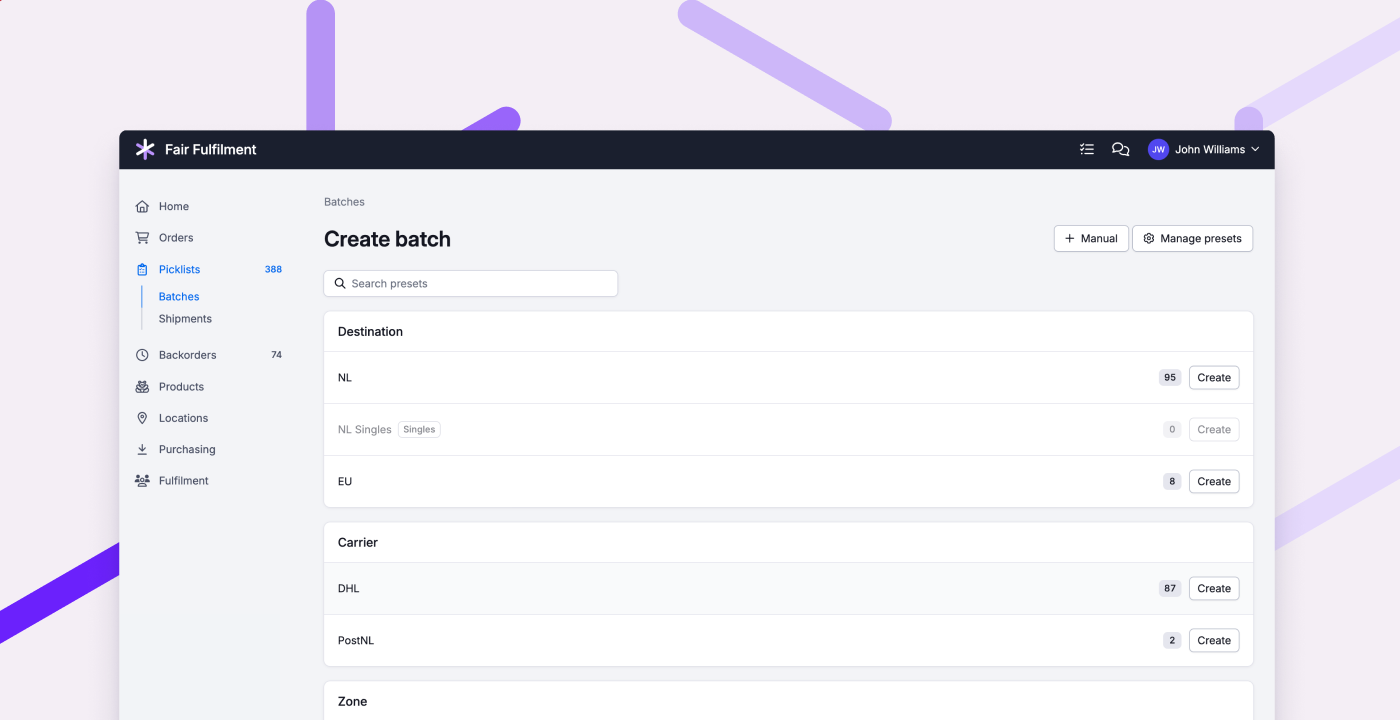
Batches save a lot of time when picking. With a batch preset, you set the right filters once, so you don't have to think about them every time. We've made that even easier: instead of starting in the form, you now pick the preset you want right away, just like you're already used to in the Picqer app. So you create a batch in one click and can start picking immediately.
Got a lot of presets? Then you'll want to find the right one quickly. That's why you can now group and sort presets, and hide them when you don't need them for a while. So your list stays organised.
The batch overview is also clearer now. Previously, open, completed, and cancelled batches were mixed together. Now you see at a glance which ones are still open, and you can filter to find what you need. You can also give a batch its own name, and see which preset was used.
Process backorders automatically
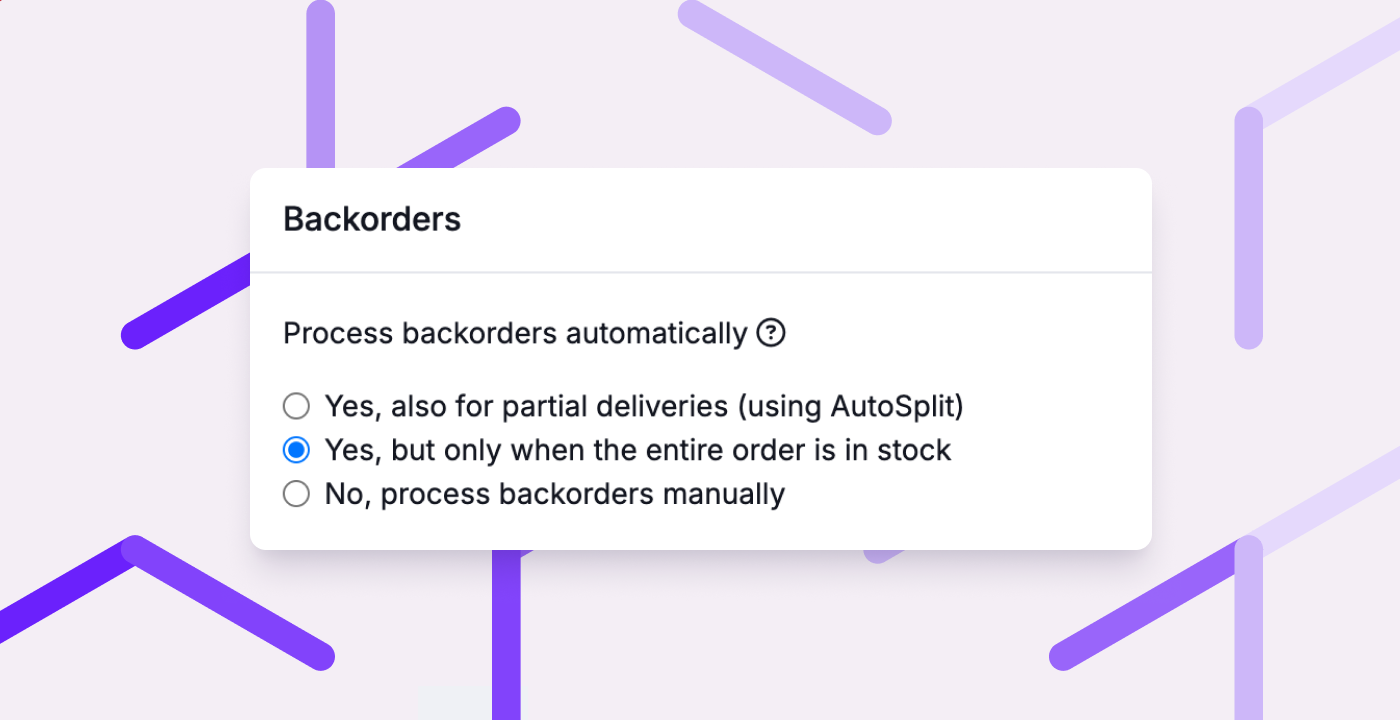
When an order is in backorder, you want it to ship as soon as possible. That's why backorders can now be processed automatically: as soon as the order is partially or fully in stock, Picqer creates a picklist. That way, backorders need less manual attention, and orders ship out faster.
Prefer to stay in control? We’ve improved manual processing too. You can now filter by warehouse, supplier, or fulfilment customer, see in advance how many picklists that will create, and set a limit.
Other improvements
- When pausing a picklist, you can now choose whether to pause just the picklist or the entire order. Useful when the issue needs to be resolved by customer service or your fulfilment customer.
- In the portal, your fulfilment customers can now set up a notification for paused orders.
- New orders from Bol now appear in Picqer sooner.
- VVB orders with Ampère are now automatically snoozed until 3:00 PM the day before handover, just like DHL Same Day.
Fixed
- Pickup points on MyParcel shipments from WooCommerce are imported into Picqer again.
- Sendcloud shipments to Northern Cyprus are created correctly again.
- Bundle products are displayed correctly on a picklist again.
- You can again type an email address in a comment without any issues.
Changelog: an updated fulfilment portal with purchase advice and more
As you may have noticed, we gave the fulfilment portal a major update last month. In this changelog, we’ll walk you through what’s new, and more.
An updated fulfilment portal
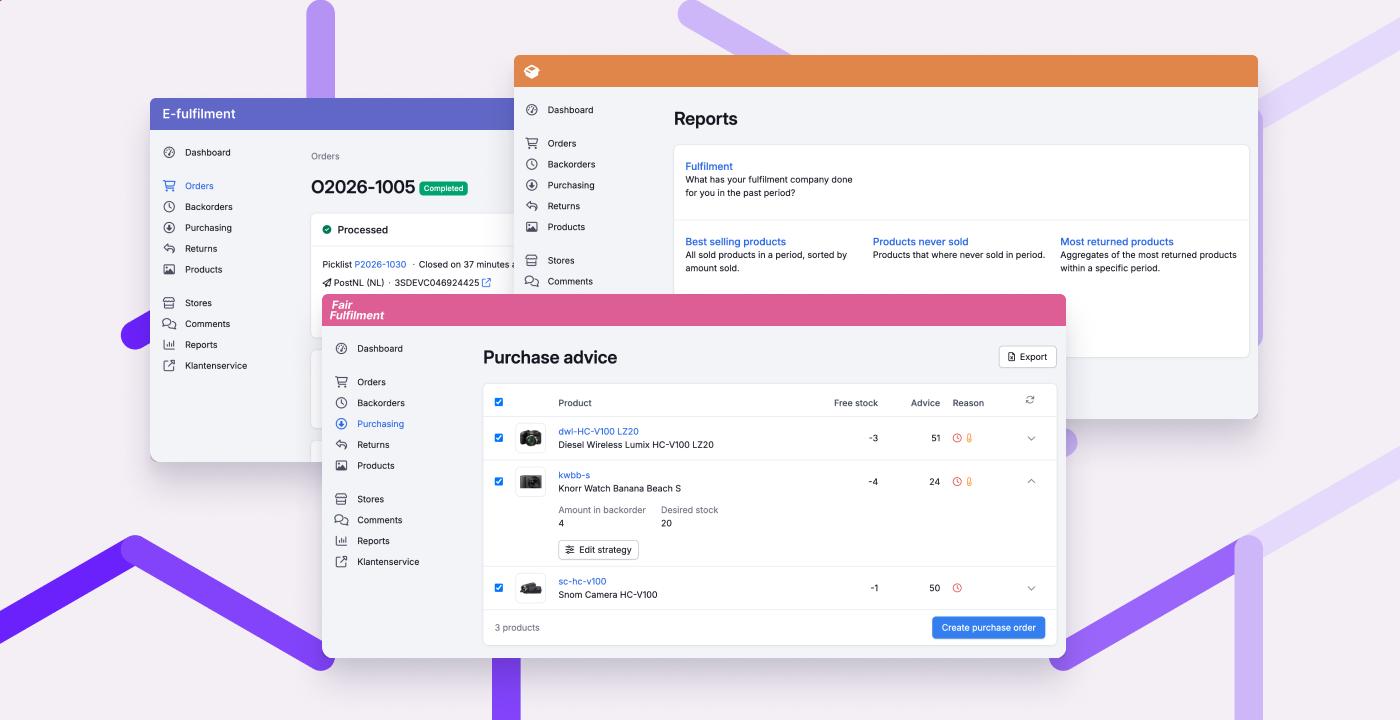
Your fulfilment customers now get a clearer overview, better insight, and more ways to help themselves. That gives you more time to focus on the warehouse. The updated portal has a more modern look, works better on mobile, and can be branded with your own colour and logo.
The biggest news: dedicated purchase advice for your fulfilment customers. They see at a glance what to purchase, and turn it into a purchase order with a single click. The advice is based on open backorders and a stock strategy they can set per product. Read more about how it works
The updated portal includes a lot more:
- Orders: your fulfilment customers can now find and create orders more easily, and see at a glance what stage an order is in.
- Cancel products: your fulfilment customers can now cancel products on an order themselves, as long as they haven't been picked yet.
- Partial deliveries: you can now choose per fulfilment customer whether they can create a picklist themselves when part of an order is in stock.
- Product management: your fulfilment customers can now (de)activate and delete products themselves, if you enabled product management for them.
- Store actions: your fulfilment customers can now import products themselves, send stock to the store, and run a extended order import, provided this is also enabled in the store settings.
- Address book: your fulfilment customers can now edit and delete addresses more easily.
- Reports: your fulfilment customers can now request reports themselves, such as the fulfilment report (showing what has been done for them), stock at a specific moment, and which products sell best or do not sell at all.
- Stock per warehouse: in the fulfilment portal settings, you can now let your fulfilment customers see stock per warehouse.
Over the coming weeks, we’ll keep improving the fulfilment portal. Got feedback or questions? Let us know.
Other improvements
- New integration: Rewize
- When processing returns, you can now choose a location per product, just like with receipts.
- The batch PDF now makes it clearer which products don't have a location.
- You can now require colleagues to scan the destination location whenever they move stock on mobile.
Fixed
- VAT on shipping costs is now processed correctly when importing Shopify orders.
- The container page is fast again, even for containers with many products.
- The overview of picklists to invoice is fast again.
- The selected warehouse is now also used for quick stock changes.
- The supplier name is now always shown correctly on purchase orders, even if you entered it manually.
- Scanning a location on mobile no longer accidentally triggers a product search.
Changelog: select your warehouse and more improvements
Over the past few weeks we've made a number of improvements. You can now choose which warehouse to work from, and picking per location now also works for batches. Read all about it in this changelog.
Select your warehouse
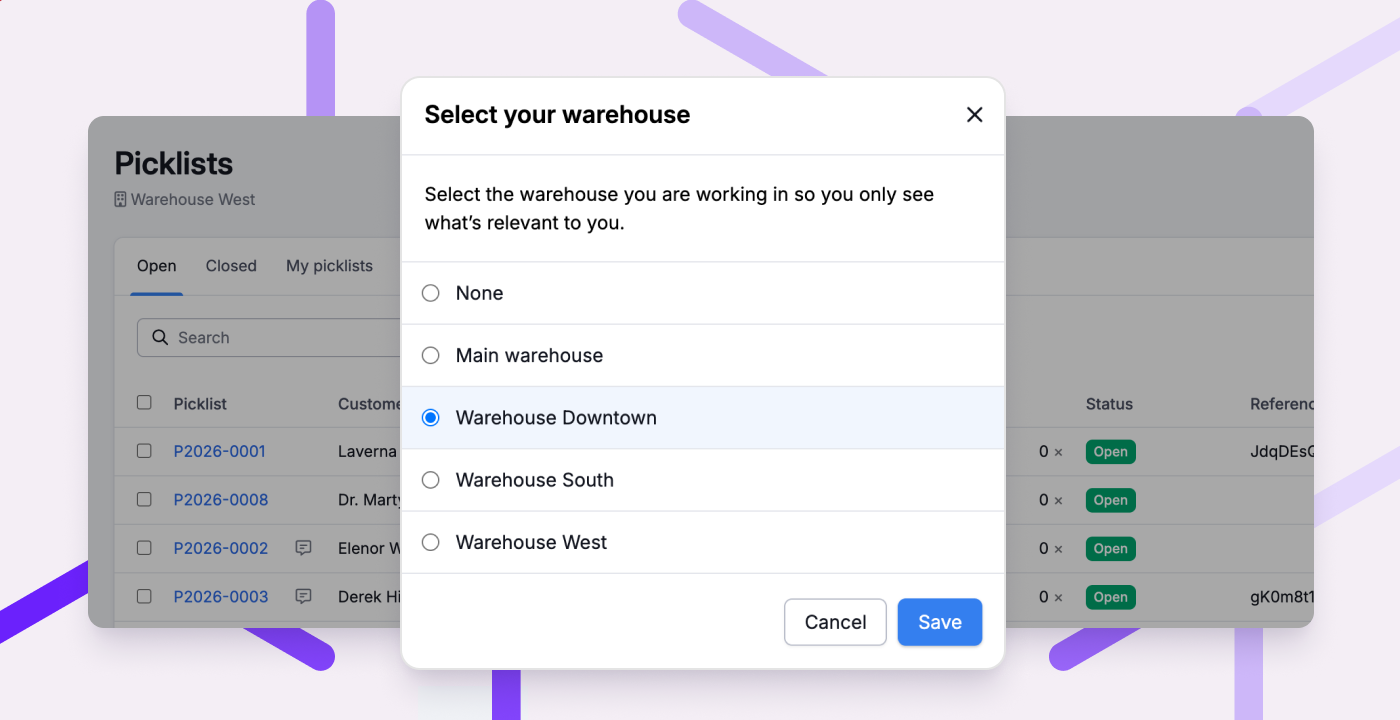
If you have multiple warehouses, you can now select which warehouse you’re working from. That way, you only see what’s relevant to you. Your chosen warehouse is also pre-filled for tasks like creating batches and stock counts, giving you better oversight and helping you avoid mistakes.
Other improvements
- In the previous changelog we introduced picking per location on picklists. This now also works for batches: you see a separate line per product-location, so you know exactly how many items to pick from each location.
- Shopify orders now include MyParcel pickup points, so you can send shipments to the correct pickup point.
- Pakketpartner shipments now support multi-colli: shipments with multiple parcels.
- For WooCommerce stores, you can now map product fields, so additional product information such as cost price and supplier is automatically imported.
- Magento 2 now uses base prices, so orders in different currencies are imported correctly.
- Within a receipt, you can now scan a location in the 'Link location' popup, so you can receive products at the correct location more quickly.
- You can now move all products from a location to a container or another location at once.
- When a location is empty after moving or adjusting stock, you're now asked if you want to unlink the location.
- You can now manage your email preferences on your profile page, such as emails about your subscription.
- You can now anonymize orders from the 'More' menu on the order page, so you can handle GDPR deletion requests yourself.
Fixed
- Discounts for configurable products from Magento 2 are now correctly imported.
- When all products on an order are canceled, the order now correctly gets the status "canceled".
- Customs information is now also sent with Sendcloud shipments from Great Britain to Northern Ireland.
- You can now (re)connect your Shopify store using any of your subdomains, not just the original subdomain.
- For multi-colli shipments via custom and external shipping providers, the weight is now correctly distributed across parcels.
- Resuming a paused order from the picklist now also works correctly in the app.
- Inactive products from Magento 2 are no longer imported with 0 stock.
- The preview when importing products now only shows products that belong to the selected fulfilment customer.
Changelog: picking per location and more improvements
We're always working to make Picqer simpler, so everyone can run a professional warehouse themselves. For example, we made it easier for new customers to get started on their own. In this changelog, you can read what else we've been working on.
Picking per location on picklists
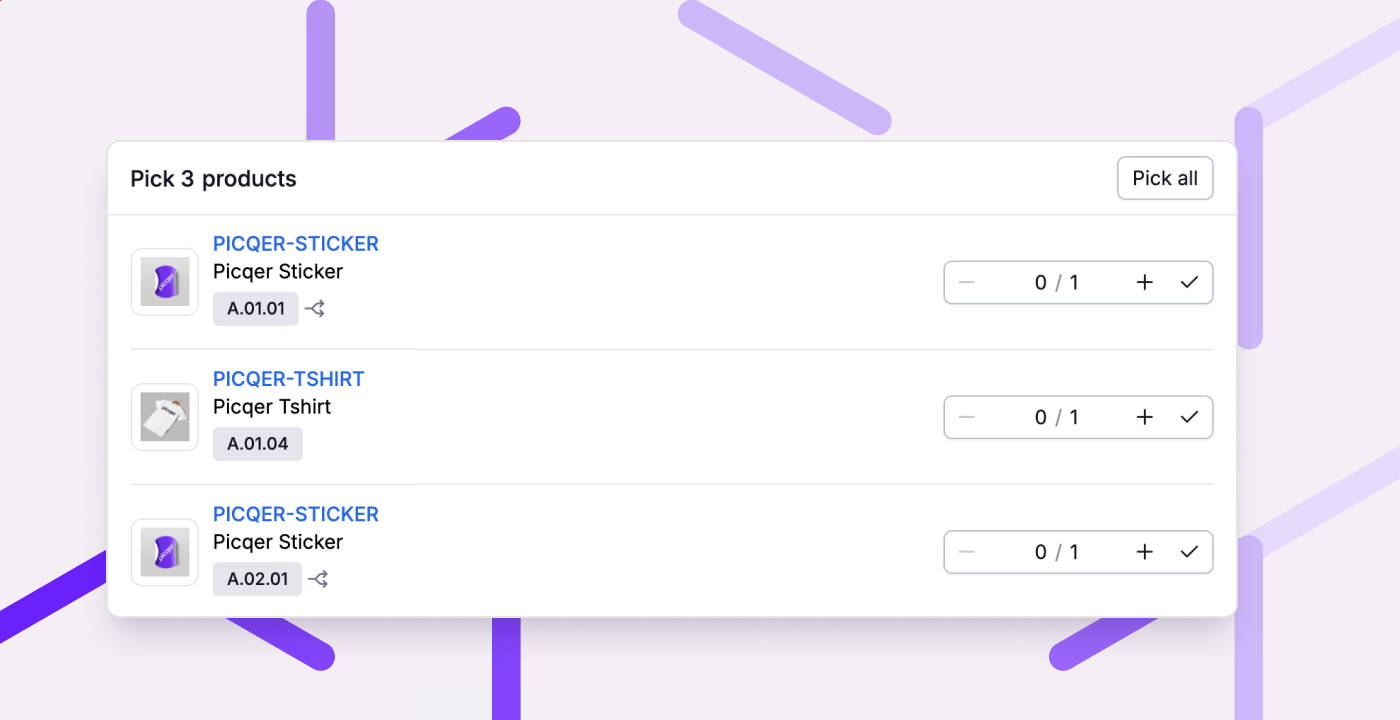
Previously, picklists always showed 1 line per product, even when that product had to be picked from multiple locations. From now on, you see a separate line per product-location. This way you not only walk the shortest route through your warehouse, but you know exactly how many items to pick from each location, and you prevent stock from getting out of sync per location.
We'll be adding this to batches soon.
Other improvements
- Picklists now have a log at the bottom of the page, just like you already know from orders. When there are more than 5 log entries, older entries are automatically collapsed.
- SendCloud shipments now include the package dimensions.
- New shipping options: PostNL mailbox parcel 48 hours, MyParcel mailbox parcel priority, and support for delivery confirmation and Trunkrs with MyParcel.
- When creating a shipment for custom and email shipping providers, you can now add a tracking URL.
- Stores that have been unreachable for more than a week are now automatically deactivated.
- For orders from CCV, you can now choose to use the product name from Picqer instead of the name from the store.
- Date filters now work the same across all reports: always a 'from' and 'up to and including' date.
- The put-away list for a purchase order now also shows product fields.
Fixed
- When many orders or products need to be imported for one fulfilment customer, this no longer slows down imports for other fulfilment customers.
- The best-selling products report now takes canceled products into account.
- We now also include customs information for shipments from non-EU countries, not just for shipments to non-EU countries.
- The comments button for batches and return backorders in the overview pages works again.
Changelog: more targeted stock counting and other improvements
Over the past few weeks, we've shipped several improvements. In this changelog, you can read what's new.
More targeted stock counting with the updated wizard
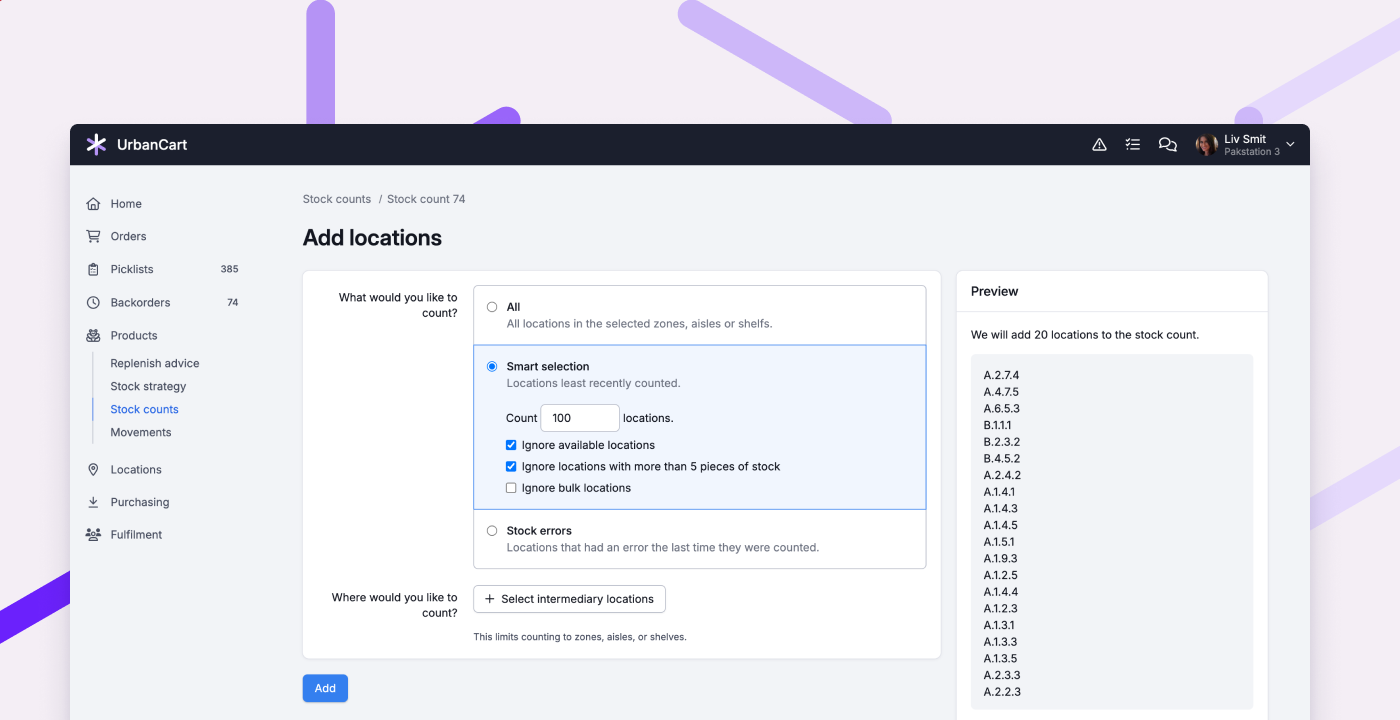
The wizard for adding locations to an stock count has been updated. You now first choose what you want to count: everything, a smart selection, or stock errors, and then optionally where you want to count. A preview immediately shows which locations will be added.
With Smart selection, you can filter more specifically for high-risk cases. For example, skip available locations, locations with more than 5 items in stock, or bulk locations. This way you only count the locations where errors have the greatest impact, without losing time counting full (bulk) locations.
Other improvements
- MyParcel shipments now include the package dimensions.
- In the app, you can now switch packing stations more easily.
- Completed receipts without received products can now be deleted.
- New integration: GLS BE/LU (for customers with a Belgian GLS contract).
- New integration: Sleak
Fixed
- In the app, the default values from the shipping profile are now correctly populated when creating a shipment.
- QLS shipments to a pickup point can now be created again for orders from Magento 2.
- Users without the correct permissions can no longer create a picklist or cancel backorders from the order page.
- On a return picklist, you can now see the name of the preselected shipping profile again.
- The comments field no longer collapses when you start typing '@'.